Javascriptを圧縮および難読化する
目次
Closure Compiler
https://developers.google.com/closure/compiler?hl=ja
不要なコードを削除して書き換え、最小限のコード量にしてくれるツールです。
昔はGUIでの提供があったらしいですが、今後はコマンドラインのみのサポートになるようです。
こちらを使い、最終的には以下のようなコマンドで
現在のディレクトリのJavascriptを圧縮できるようにします。
例:sample.jsを圧縮し、sample.min.jsが出来上がる
js-compiler sample.js sample.min.js🚨OpenJDKが必要
こちらに関して、インストール済みでパスが通っているかの確認をお願いします。
Homebrewだったら brew install openjdk でインストールできます。
私の環境では以下のようになっています。
java -version

# openjdk version "21.0.1" 2023-10-17
# OpenJDK Runtime Environment Homebrew (build 21.0.1)
# OpenJDK 64-Bit Server VM Homebrew (build 21.0.1, mixed mode, sharing)
最新のClosure Compilerをダウンロード
- 以下にアクセスし、 Version で一番上のバージョンをクリック。2024/06/30時点では v20240317 でした。
https://mvnrepository.com/artifact/com.google.javascript/closure-compiler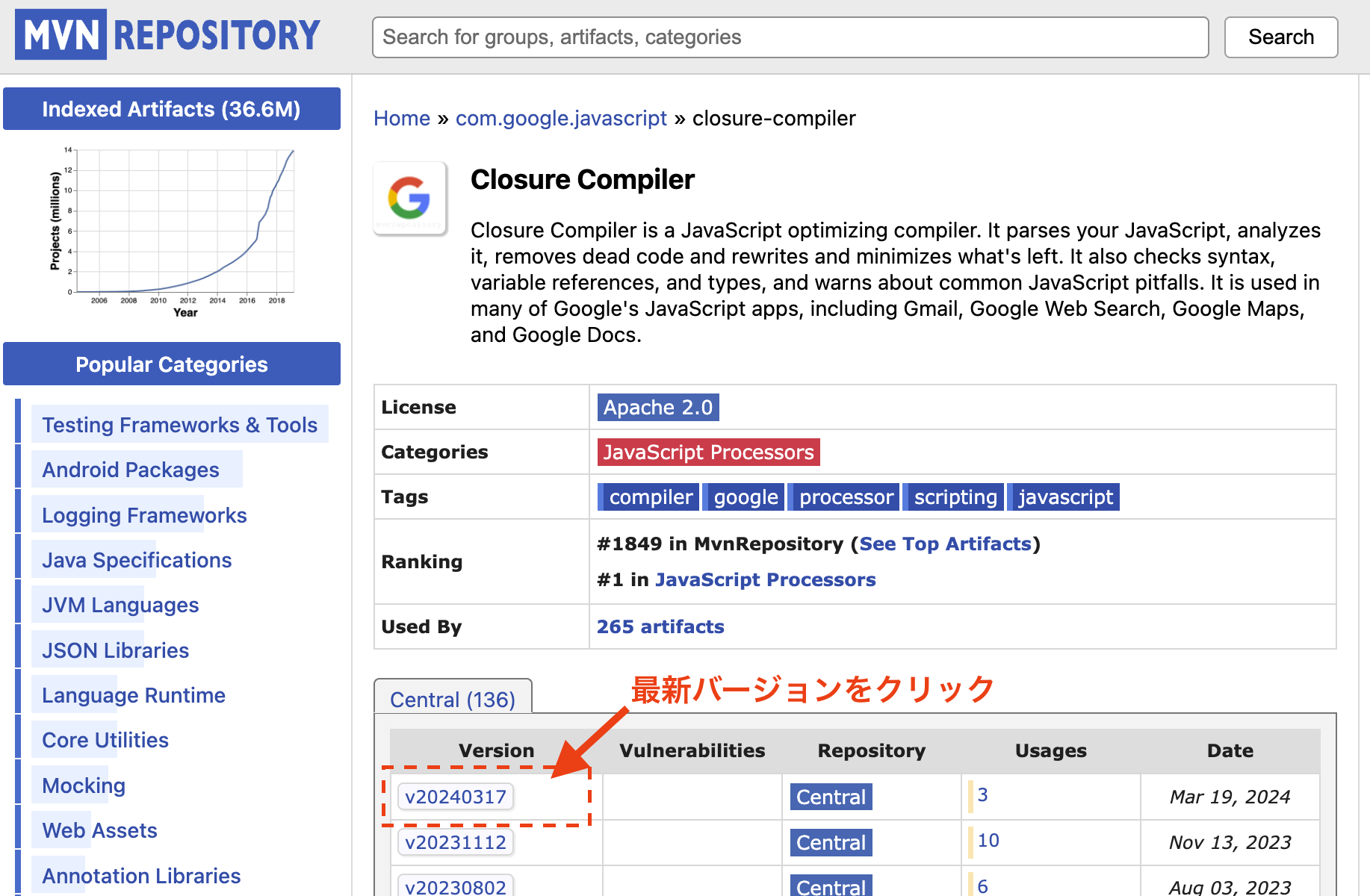
- Files > jar ファイルをクリックして任意の場所にダウンロードする。
例:~/closure-compiler/closure-compiler-v20240317.jarに保存
コマンドエイリアスを定義
Closure Compiler の文法は以下の通り。
java -jar compiler.jar [その他オプション] --js 圧縮対象JSファイル --js_output_file 圧縮後のファイル名~/.bash_alias に以下を追記して source ~/.bash_alias を実行。
function js-compiler () {
    command java -jar ~/closure-compiler/closure-compiler-v20240317.jar --js $1 --js_output_file $2
}
サンプルで動作確認
js-compiler sample.js sample.min.js圧縮前 (sample.js)
長い変数名、未使用関数を定義、無駄に改行を含ませます。
function kakezanTestFunction(numberArgument) {
  return 100 * numberArgument;

}

function helloWold(greetingMessage) {
  const word = "おはよう!";
  console.log(word + greetingMessage);
}

helloWold("me");

// コメント
const now = Date();
console.log(now);
圧縮後 (sample.min.js)
function kakezanTestFunction(a){return 100*a}function helloWold(a){console.log("\u304a\u306f\u3088\u3046!"+a)}helloWold("me");const now=Date();console.log(now);長い変数名が短くなり、空白や改行・コメントがなくなりました。
より圧縮&より難読化させる
以下のように --compilation_level オプションを付与することで、コンパイルレベルを指定できます。
コンパイルレベルは「空白改行のみ削除」「シンプルな最適化」「ADVANCED」の3つあります。
https://developers.google.com/closure/compiler/docs/compilation_levels?hl=ja
java -jar compiler.jar --compilation_level [圧縮レベル] --js hello.js --js_output_file hello.min.js以下のように実行できるようコマンドエイリアスを変更します。
js-compiler sample.js sample.min.js [--space-only | --advanced | 未指定]コマンドエイリアス変更
例えば以下のように修正して、3つの圧縮レベルを選択できるようにします。
# 空白改行のみ削除: --space-only
# シンプルな最適化: 未指定
# ADVANCED     : --advanced
function js-compiler () {
  if [ "$3" = "--space-only" ]; then
    LEVEL="WHITESPACE_ONLY"
  elif [ "$3" = "--advanced" ]; then
    LEVEL="ADVANCED_OPTIMIZATIONS"
  else
    # デフォルトの圧縮レベル
    LEVEL="SIMPLE_OPTIMIZATIONS"
  fi

  command java -jar ~/closure-compiler/closure-compiler-v20240317.jar --compilation_level "${LEVEL}" --js $1 --js_output_file $2
}
サンプルで動作確認
先ほどの動作確認で使ったJSファイルを圧縮してみます。
空白改行のみ削除
function kakezanTestFunction(numberArgument){return 100*numberArgument}function helloWold(greetingMessage){const word="\u304a\u306f\u3088\u3046!";console.log(word+greetingMessage)}helloWold("me");const now=Date();console.log(now);長い変数名も未使用の関数もそのままですが、空白と改行・コメントがなくなっています。
シンプルな最適化(デフォルト)
デフォルトはこのレベルになっており、先ほど実施したため割愛しますが
このレベルは、長い変数名が短くなり、空白と改行・コメントがなくなっていました。しかし、未使用の関数はそのままでした。
アドバンスド
console.log("\u304a\u306f\u3088\u3046!me");console.log(Date());長い変数名が短くなるどころか、不要な宣言がなくなりコードが最小限に、空白と改行・コメント、そして未使用の関数もなくなってしまいました。
このレベルで圧縮すると、色々削除されてスッキリしてしまうので注意が必要です。
公式から詳細を確認できます。
https://developers.google.com/closure/compiler/docs/api-tutorial3?hl=ja#dangers
おしまい!